Catch quality issues before customers do.
Non-conformances, customer complaints, internal defects. Fast containment, structured resolution, trend analysis to prevent recurrence.
Trusted by operations teams worldwide






15,000+Active users 59Countries 190,000+Problems solved
Late discovery cost you ten times more
A defect slipped through and reached the customer. The investigation revealed the issue started three shifts ago, but nobody flagged it. Every hour of delayed detection multiplied the cost.
Now containment starts in minutes
In TeamGuru the alert starts the moment someone spots the problem. Containment actions get a name and a date within minutes, not days. Every issue takes the same path from detection to a fix that holds, and the reports show where problems keep coming from.
A quality alert in TeamGuru
One wrong reel of film, from the first photo to a closed alert
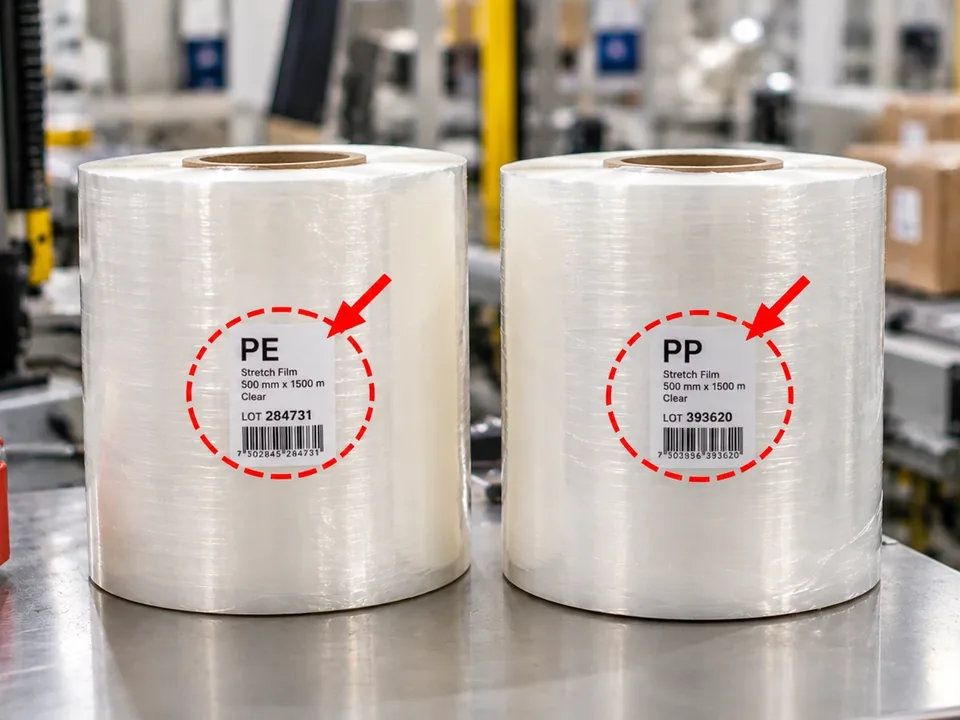
Two reels of film look the same. One is PE, the other PP, and only the label tells them apart. On Monday morning the wrong one went on Line 4, and 500 packed parts left for the customer before anyone noticed. Here is how the plant handles it in TeamGuru, from a photo on a phone to the chart in the monthly report.
- 1
Anyone raises it in two minutes
The packer on Line 4 photographs the two reels and notes what they know: what is wrong, how many pieces, which customer. From a phone or the line terminal. Anyone can raise an alert, light users too where you set it up.
Any user · phone or line terminalNew Quality AlertTitlePE film instead of PP on Line 4Reject TypeWrong materialQty Defective500CustomerNorvik AutomotiveSeverity HighPhoto Save - 2
Protect the customer first
Stock Hold says which lots are blocked and where they sit, whether you may ship under deviation and whether safety is at risk. The immediate actions come from your template: block the lots, stop shipments, sort the stock at the customer. Each one has a name and a date.
Stock Hold ActionsDetailsBlock lots PK-4417, PK-4418. Quarantine area B3.
Can ship under deviation with customer consent: No Safety Issue: NoCorrective / Preventive Actions From action templateProtect customers: immediate actions- Block lots PK-4417 and PK-4418 L. Roberts 9/8 100 %
- Stop shipments to Norvik J. Chen 9/8 100 %
- Sort stock at the customer M. Turner 9/9 50 %
- 3
The right people know in one click
Whom To Inform lists the groups and people who need to know. One button sends the alert to all of them. When something changes, Notify Alert Update sends the news to the same list, and nobody has to forward emails.
Whom To Inform- Quality Engineers
- Shipping Torrance
- LR Lisa Roberts
- JC James Chen
Send Alert Notification Notify Alert UpdateSent to 14 people · 9/8, 7:42 AM - 4
The root cause gets its own document
Initiate RCCA starts the cause analysis, Initiate 8D the report for the customer. The new document is linked to the alert, and the alert shows how many of its actions are open or overdue. The whole case stays in one place.
Related Documents (2)Initiate RCCA Initiate 8D- 8D Open 3, Overdue 0PE film instead of PP on Line 4Torrance
- RCCA Open 2, Overdue 1PE film instead of PP on Line 4Torrance
- 8D
- 5
Closed only when the fix holds
The alert moves from Open to Analyzed, Pending and Monitor. In Monitor you check that the problem stays away, then you close it. Cost of poor quality and reject type feed a report widget: management sees which problems cost the most.
Completion Status Cost (COPQ): $18,400OpenAnalyzedPendingMonitorClosedQuality alerts Update for September 2026Cost of poor quality by reject type ($k)189642Material Damage Dimension Label SurfaceNew alerts per month14121298Apr May Jun Jul Aug
The screens show one customer's setup. Header fields, status names, action templates and who gets informed are configured to fit your plant.
What you get
Rapid containment
One button informs everyone on the alert's list, and an action template adds your standard containment steps. Defective product stops before it reaches the customer.
Nonconformance workflow, report to closure
Every nonconformance report (NCR) moves through the same statuses, from Open to Monitor and Closed: containment, root cause, corrective and preventive actions, then a watch period before closure. The alert links to the RCCA or 8D it started, so auditors follow the whole chain.
Trend analysis
A report widget shows alerts and cost of poor quality by reject type, product or customer. You see which problems keep coming back and where prevention pays off.
Customer complaint integration
Customer complaints enter the same quality management workflow as internal findings, ensuring external issues get the same rigorous treatment.
Presenting this to your team or management?
Download a two-page overview of the Quality Alerts module to share or print.
Everything connects.
Quality Alerts works on its own. Connected to the rest of TeamGuru it does more: every module below runs on the same platform, with one login.
Root Cause Analysis
Initiate RCCA from the alert, linked with its open and overdue actions.
Partner Collaboration
Customers and suppliers join through Partners, on the alerts you share.
8D Problem Solving
Customer affected? Initiate 8D starts the formal report, linked to the alert.
Document Control
What the alert uncovered and fixed becomes the documented standard.
Tier Meetings
Open quality alerts can be reviewed at the SQDIP board in the tier meeting.
Management Reports
Open alerts, cost of poor quality and recurring problems for management.
Common questions
Who can raise a quality alert? +
Can we classify alerts by severity? +
How quickly are people notified? +
Can suppliers see quality alerts related to their products? +
Does the system track the cost of quality issues? +
Is TeamGuru a nonconformance (NCR) management system? +
See Quality Alerts in action
Book a personalized demo and see how TeamGuru handles Quality Alerts for teams like yours.