
One of TeamGuru's greatest advantages is linking all key strategic management steps (from strategic planning, follow-up actions and projects, KPIs tracking and their analysis + corrective actions) as needed.
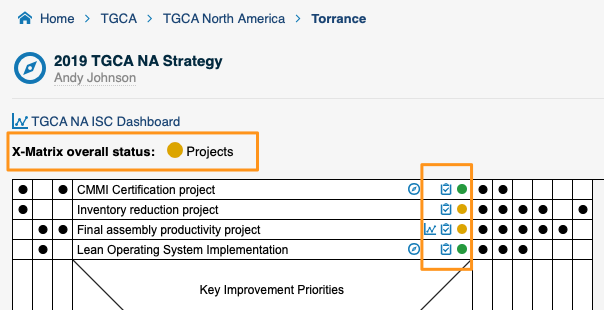
We are excited to share with you a new beneficial feature. Monitoring projects couldn't get any easier. Now you are able to overview project's status directly in X-Matrix.
X-Matrix will display not only the status of individual projects, but also overall status.
Step 1 - Click Edit Pencil icon for the X-Matrix

Step 2 - Check the box for "Show project status in X-Matrix"

Step 3 - All done and ready to monitor project's status directly in your X-Matrix
The TeamGuru Way
We keep improving your experience every day.
Do you have an improvement idea? Share it with us.
Do you have friends or colleagues that could benefit from TeamGuru? Let us know.
About the author

Kate Apking
Customer Success Enthusiast at TeamGuru. Kate works closely with teams using TeamGuru in their day-to-day management and writes about leadership, adoption, and management best practices.