
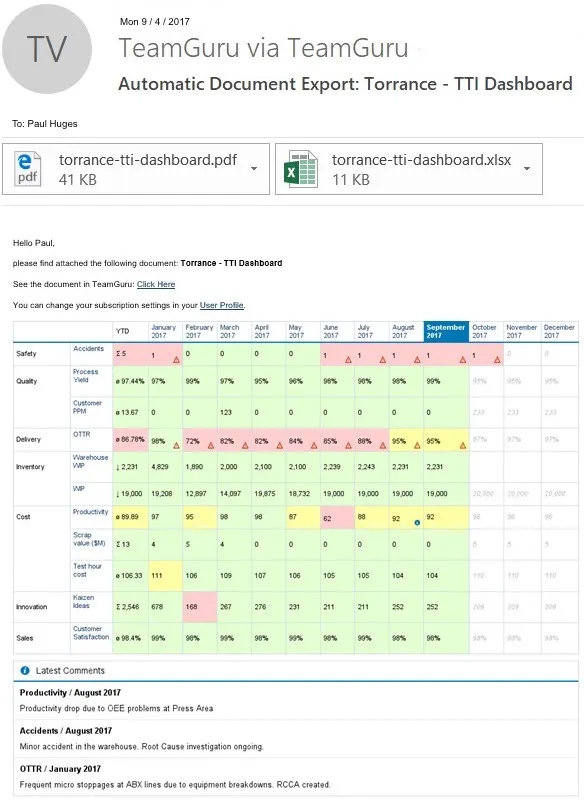
Are you in a hurry and don't have time to log in and review your metrics dashboard? From now on you can automatically receive updated Metric Dashboards of your choice by email including the latest comments.
You can subscribe to have this option in a few easy steps. Set up your own preferences as a day, time, date, how often and you are ready to go.
How To Do It:
Step 1
Click on your name in the main toolbar to access your personal preferences window.
Step 2
In the "My Document Subscriptions" section click on the + icon and add a new document. Then select the metric dashboard that you would like to be emailed to you.
Step 3
Choose the day, time, and the recurrence (e.g. you can receive your report every Monday at 7 am).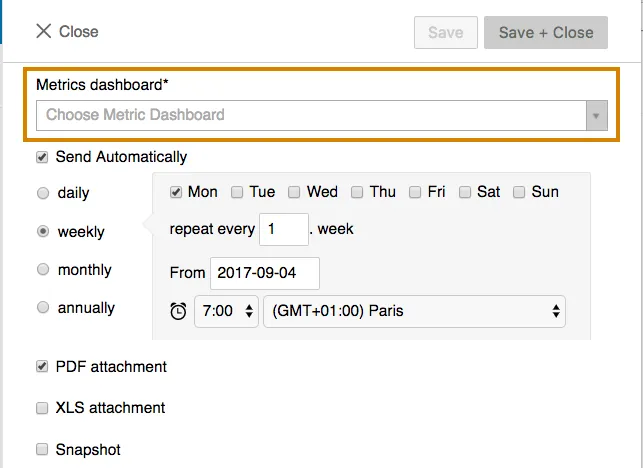
That's it. Now you will start receiving your reports:
About the author

Kate Apking
Customer Success Enthusiast at TeamGuru. Kate works closely with teams using TeamGuru in their day-to-day management and writes about leadership, adoption, and management best practices.