
Are you using multiple data platforms to visualize and report your data? Then you know how hard it is to share and link those insights to the business. When there comes a need like this, tap your TeamGuru Integrations widget to solve this gap once and for all.
Does it sound too good to be true? Give it a try!
You can embed any external worksheets, like your elaborate Tableau charts or detailed Power BI data visualizations, into your TeamGuru Reports. Simply open a new topic in your Report, select the Integrations widget, and paste your workbook's URL. Save and share your complete model in TeamGuru.
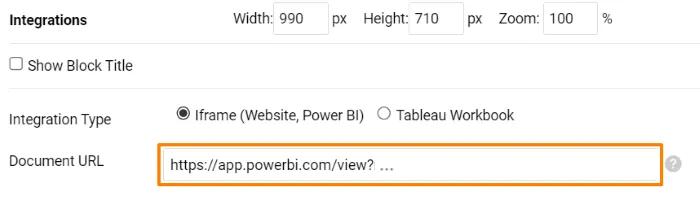
Please note that your worksheet address must be added to the allowed sources in the TeamGuru configuration. In case any assistance is needed, please do not hesitate to get in touch with support@teamguru.com. We will be happy to add it for you.

Are you ready to give this enhancement a try?
Right on! Our team is ready to answer your questions or assist whenever you need it.
About the author

Eva Strapková
Digital operations consultant. Eva writes about digital operations, TeamGuru product developments, and how organizations put new capabilities into practice.