Critical Path: Deliver on Time, Every Time
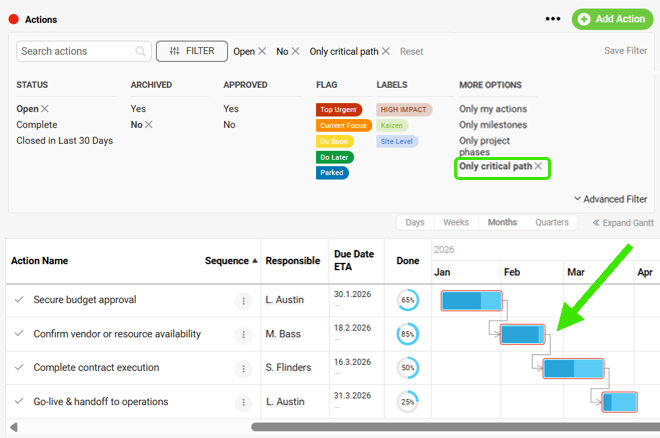
Pinpointing the critical path is now quick, accurate, and effortless. The system automatically detects the longest chain of tasks based on timelines and dependencies, then labels each one as part of the critical path—no deciphering required. And when you're ready to focus, you can simply filter your action list to spotlight only those critical tasks, giving you a clean view of the work that keeps your project flying right on schedule.

Instant Metric Filters, Just Click!
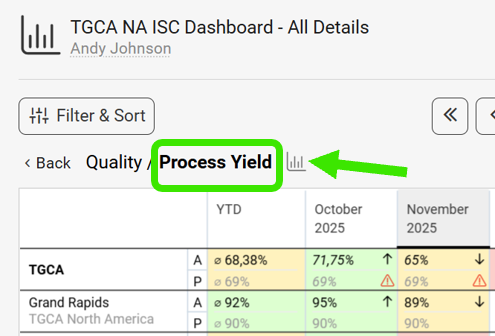
Metric Charts have moved! Now when you click on the metric, you are essentially setting a filtered view. If you are looking for the associated charts, look no further than the new chart icon right by the metric name.
Waterfall Charts Now Available
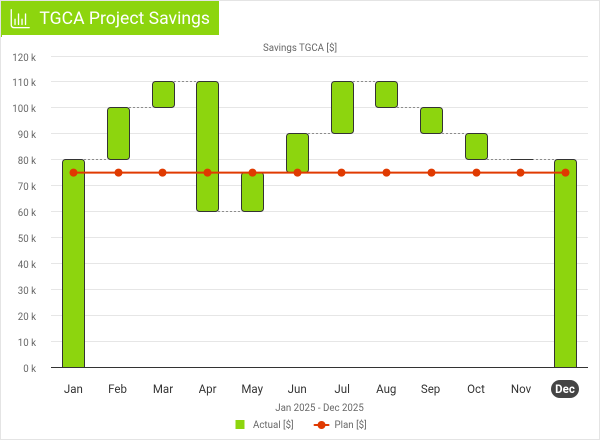
Waterfall charts are now available, giving you a clear way to see how each step influences your final outcome. It's an intuitive way to understand what moved you forward, what set you back, and how you ultimately landed on your end result, making it easier to stay aligned and on time.
Fine-Tuning Approvals, One Step at a Time
You can now make changes at the individual-step level—adjusting the approver for a specific stage or removing that step entirely if it doesn't apply to the document at hand. Instead of reworking the whole sequence, you can fine-tune only what's needed, keeping the overall process clean, relevant, and moving smoothly from step to step, ensuring your status on the nice list this year.

Are you ready to give these enhancements a try?
Right on! Our team is ready to answer your questions or assist whenever you need it.