Customizable Safety Alerts Stages
Do you need full clarity and control over safety follow-ups?
The new stages in Safety Alerts let you define exactly how alerts move through your workflow. Assign responsibilities, guide alerts through necessary approvals, and ensure nothing gets missed. Now you can control the process, involve the right review team, and get approvals where they matter most—all while keeping the workflow simple and effective.
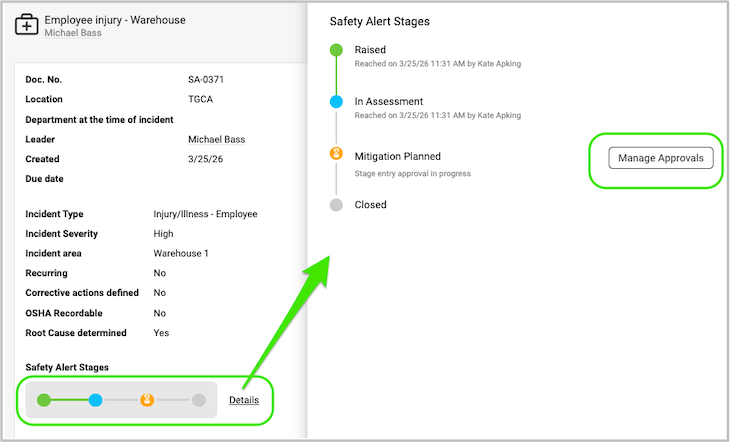
Learn More Here: How to set up SA stages workflow
*Requires Sufficient User Rights

Mass Import Your Kaizens
Ready to start tapping into your workforce’s ideas?
Now you can import all your existing Kaizens and add new ones directly into TeamGuru, turning scattered suggestions into structured initiatives. This gives your team more visibility, smoother collaboration, and actionable insights, so every idea has the chance to grow and deliver value.
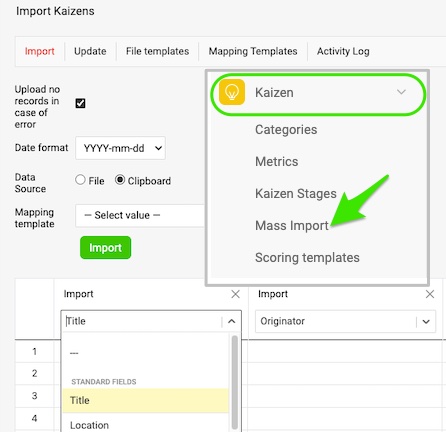
*Requires Sufficient User Rights
Kaizen Scoring: Elevate Your Ideas
Want a simple way to prioritize the concepts that matter most?
Customizable scoring in your Kaizen documents lets you assess impact, feasibility, and value at a glance. By setting criteria that matter most to your team, you can quickly see which concepts are ready to move forward and which need more work. It turns a list of ideas into a defined roadmap—making improvement faster, smarter, and more impactful.
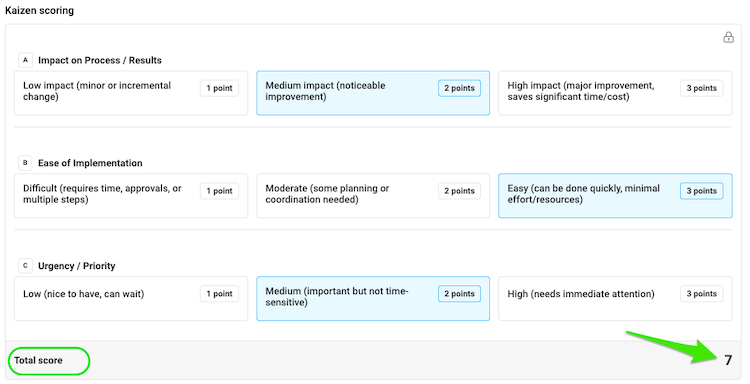
*Requires Sufficient User Rights
Kaizen Approval Stages: The Next Act
Even the best ideas can stall without a clear workflow.
Kaizen stages guide each concept from submission to review to approval, so nothing gets lost or delayed. Your team’s ideas move forward, gain recognition, and deliver measurable value—turning inspiration into action. No more limbo, no confusion—just a straightforward path from concept to impact.
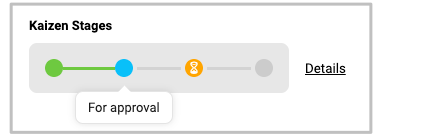
*Requires Sufficient User Rights
Are you ready to give these enhancements a try?
Right on! Our team is ready to answer your questions or assist whenever you need it.