Elevate Your Action Details with an Image
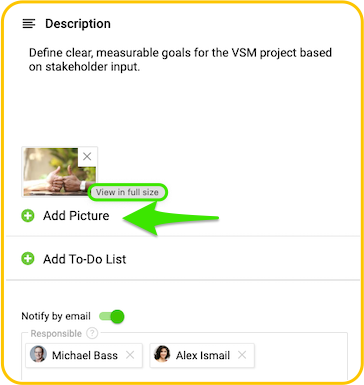
Action details just became more visual. Add images directly within the description field rather than as file attachments. This will help you improve clarity and quickly understand information at a glance.
Simply click an image to open a full-size view for more details.
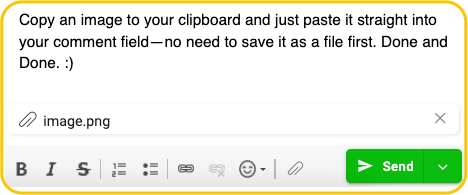
Snap, Add, Done: Action Comments — Picture Ready
Copy your image and drop it straight into an Action’s comment field—no saving, no extra steps, no fuss. Just paste it in and you’re done. It’s a quick, effortless way to share visuals right when you need them, keeping everything fast, smooth, and in the flow.
Global Search Filters Expanded
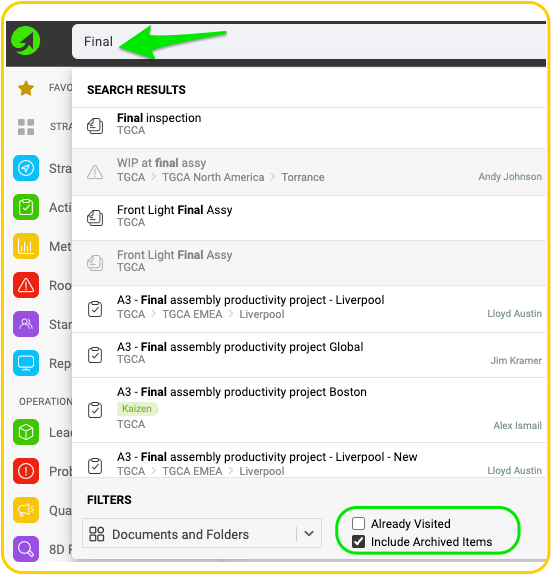
Two new filter options have been added to the Documents Global Search: Already Visited and Include Archived Items. These filters will appear based on what you type in the search field, making it easier to refine results and find the documents you need.
Extra bonus: Archived documents will be greyed out for clearer visual distinction.
Filter Actions by % Status Like a Pro
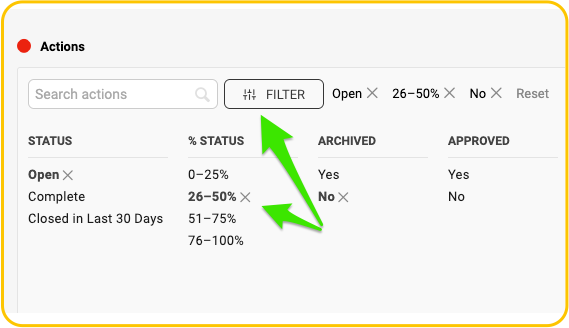
Action Status can now be filtered by percentage, allowing you to go beyond just open or completed items. Narrow results using status ranges to better pinpoint where each action stands in progress. This also enables you to use the same criteria in Reports slides to pull in and group actions more effectively.
Are you ready to give these enhancements a try?
Right on! Our team is ready to answer your questions or assist whenever you need it.